Beauty and the Beast Pantomime — Channel List
A full channel map for the sound operators during the Beauty and the Beast pantomime.
🎛️ Input Channels
| Fader | Channel | Type | Character / Source | Group |
|---|---|---|---|---|
| 1 | 1 | Stage mic | Front Left Stage | Stage Mics |
| 2 | 2 | Stage mic | Front Mid Stage | Stage Mics |
| 3 | 3 | Stage mic | Front Right Stage | Stage Mics |
| 4 | 4 | Stage mic | Rear Left Stage | Stage Mics |
| 5 | 5 | Stage mic | Rear Right Stage | Stage Mics |
| 6 | 6 | Stage mic | Floor Left Stage | Stage Mics |
| 7 | 7 | Stage mic | Floor Right Stage | Stage Mics |
| 8 | 8 | Trantec | Felix - Annette | Radio Mics |
| 9 | 9 | Trantec | Ma - David | Radio Mics |
| 10 | 10 | Trantec | Beauty - Tor | Radio Mics |
| 11 | 11 | Trantec | Beast - Chris | Radio Mics |
| 12 | 12 | Trantec | Prince / Table - Kelly | Radio Mics |
| 13 | 13 | Trantec | Malabelle - Jess | Radio Mics |
| 14 | 14 | Trantec | Talking Clock - Sion | Radio Mics |
| 15 | 15 | Trantec | Jacques - Jac | Radio Mics |
| 16 | 16 | Trantec | Capucine - Megan | Radio Mics |
| 17 | 17 | Trantec | Aimee - Alison | Radio Mics |
| 18 | 18 | Trantec | Remy - Beth | Radio Mics |
| 19 | 19 | Trantec | Chest of Drawers - Liz | Radio Mics |
| 20 | 20 | Sennheiser G4 | Lamp - Maz | Radio Mics |
| 21 | 21 | Sennheiser G4 | Rug - Sima | Radio Mics |
| 22 | 22 | Sennheiser G4 | Spare | Radio Mics |
| 23 | 23 | Band | Piano/Lisa Mic | Band |
| 24 | 24 | Band | Guitar | Band |
| 25 | 25 | Band | Bass | Band |
| 26 | 26 | Band | Band recording | Video only |
| 27 | 27 | — | Spare | - |
| 28 | 28 | — | Spare | - |
| 29 | GRP1-2 | Group | Stage Mics | - |
| 30 | GRP3-4 | Group | Radio Mics | - |
| 31 | GRP5-6 | Group | Band | - |
| 32 | ST3 | Aux Input | QLab | Direct |
| Layer 2 | ST2 | Aux Input | iPad (pre-show background music) | Direct |
N.B - On the QU32 only channels 1-16 allow Automatic Mic Mixing (AMM). This year only the stage mics (ch 1–7) are in AMM. They are always open and pick up the same sound, so AMM shares the gain between them. The radio mics (ch 8–22) are not in AMM; open and ride them by hand on cue. Do not assign ch 8–16 to AMM, although those channels allow it. The guitar mic is not used this year, and channels 27–28 are spare. To keep everything on 32 faders, the Side Left and Side Right stage mics are not used this year. QLab takes the fader that Group 7-8 used in Pinocchio, and the iPad is on a second layer because it is only used for background music before the show.
All input faders start at −∞ in the scene. Bring each one up at the soundcheck.
See Avoiding Feedback with the Stage Mics for how to set up the AMM and ring out the stage mics.
Radio Mics
- Prince / Table (Kelly) — Kelly plays both the Prince and the Table, so one mic covers both. The Beast (Chris) is a separate mic.
- Lamp, Rug and Spare (Sennheiser G4) — The 12 Trantec packs go to the main characters. The three extra Sennheiser G4 beltpacks cover the Lamp, the Rug and a spare.
- Royal Pages (Jacob, Bleddyn) — No mic of their own. They only speak in Scene 1, so they use the stage mics, or wear the Lamp and Rug packs in Scene 1 and hand them back before Scene 4.
- Spare — Keep it rigged and ready to replace a failed pack, especially on channels 8–16.
Stage Mics
- Front Left Stage, Front Mid Stage, Front Right Stage — Overhead microphones suspended at the front of the stage
- Rear Left Stage, Rear Right Stage — Overhead microphones positioned near the curtains, directed toward the rear of the stage
- Floor Left Stage, Floor Right Stage — Floor-mounted microphones positioned at the front of the stage
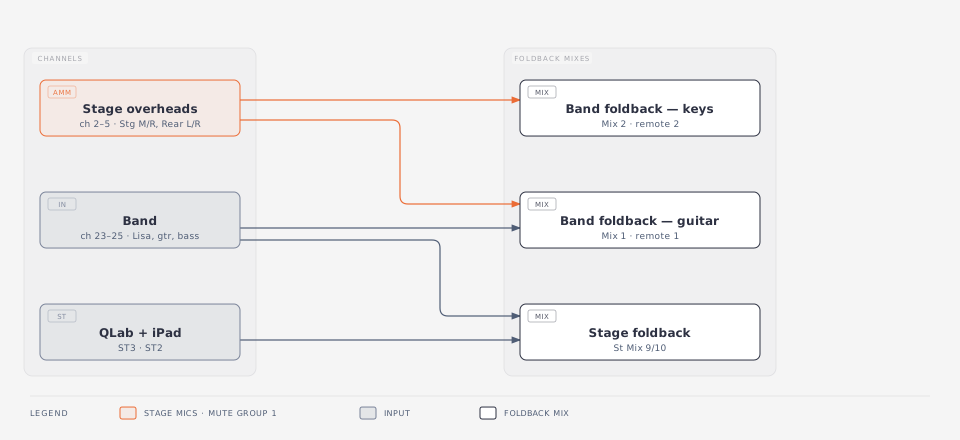
- Foldback — Front Mid, Front Right, Rear Left and Rear Right also send directly to the band foldback (Mix 1 and Mix 2), not through Group 1-2. Muting Group 1-2 does not mute them in the band foldback. Use mute group 1 (StgMic) to mute them everywhere.
Band
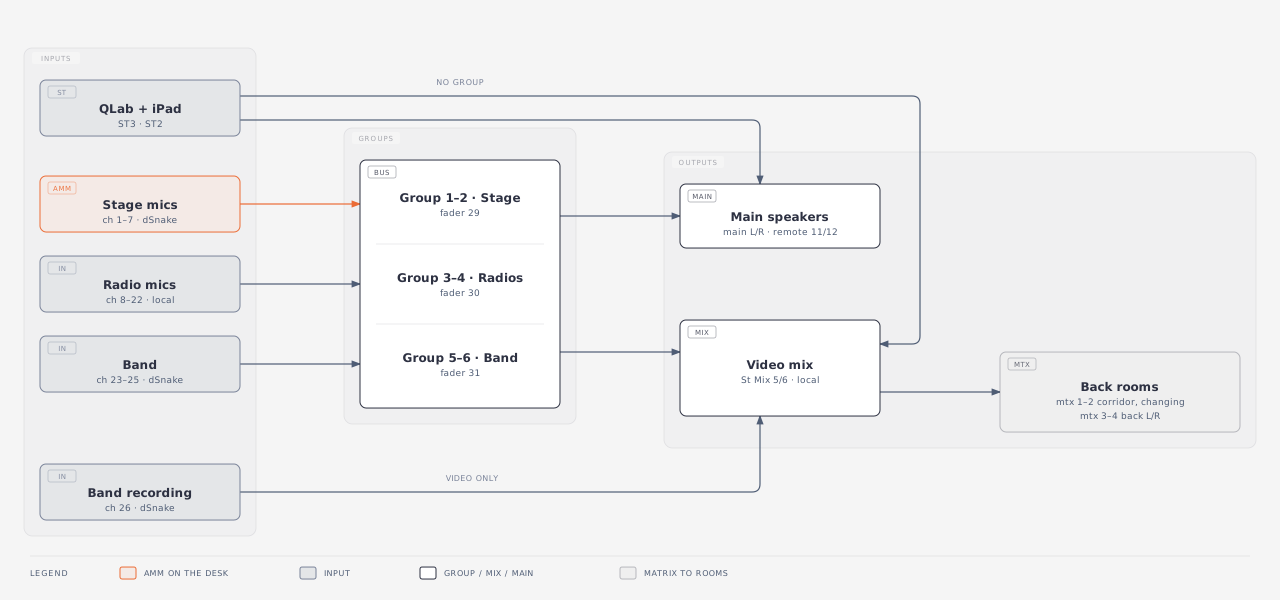
- Band recording (ch 26) — Goes to the video mix only. It is not in a group and not in the main mix. The send to the video mix is post-fader, so the ch 26 fader must be up for the video mix to get it.
🎚️ Output Routing
| Output | Use | Local / Remote | Channel |
|---|---|---|---|
| Matrix 1 L | Corridor | Remote | 5 |
| Matrix 2 R | Changing Rooms | Remote | 6 |
| Matrix 3 L | Back L | Remote | 7 |
| Matrix 4 R | Back R | Remote | 8 |
| Group 1-2 | Stage Mics | Group | — |
| Group 3-4 | Radio Mics | Group | — |
| Group 5-6 | Band | Group | — |
| Group 7-8 | Not used (QLab and iPad route direct to the mixes) | — | — |
| Mix 1 | Band Foldback Gtr | Remote | 1 |
| Mix 2 | Band Foldback Keys | Remote | 2 |
| Mix 3 | Band Foldback Drums (nothing sent to it yet) | Remote | 3 |
| Mix 4 | — | — | — |
| Mix 5/6 | Video | Local | 5/6 |
| Mix 7/8 | — | — | — |
| Mix 9/10 | Stage Foldbacks | — | 9/10 |
| Main L | Main Speakers | Remote | 11 |
| Main R | Main Speakers | Remote | 12 |
| DCA1–4 | Not used this year | — | — |
| FX1 | — | — | — |
| FX2 | — | — | — |
| FX3 | — | — | — |
| FX4 | — | — | — |
Malabelle (ch 13) has pyro entrances in Scenes 1 and 8. Open her mic before the pyro.
Mix sources
| Mix | Fed by |
|---|---|
| Main L/R | Group 1-2, Group 3-4, Group 5-6, QLab, iPad |
| Mix 5/6 (Video) | Group 1-2, Group 3-4, Group 5-6, QLab, iPad, Band recording (ch 26) |
| Matrix 1–4 | Mix 5/6 (Video) |
| Mix 1 (Band Foldback Gtr) | Front Mid, Front Right, Rear Left, Rear Right stage mics; Piano/Lisa Mic, Guitar, Bass |
| Mix 2 (Band Foldback Keys) | Front Mid, Front Right, Rear Left, Rear Right stage mics |
| Mix 9/10 (Stage Foldbacks) | Piano/Lisa Mic, Guitar, Bass, QLab, iPad |
Mute groups
A mute group mutes the channels themselves, so it also mutes their sends to the foldback mixes. Muting a group fader only mutes what goes through that group.
| Mute group | Name | Channels |
|---|---|---|
| 1 | StgMic | 1–7 (stage mics) |
| 2 | Radios | 8–22 (radio mics) |
| 3 | Band | 23–26 (band) |
| 4 | — | Not used |
Diagrams
Signal flow
How the inputs reach the main speakers and the video mix for the back rooms. QLab and the iPad are not in a group; they go directly to the main mix and the video mix. The band recording goes to the video mix only.
Foldback
What each foldback mix gets. These are sends from the channels, not from the groups.
Click a diagram to open it full size in a new tab.